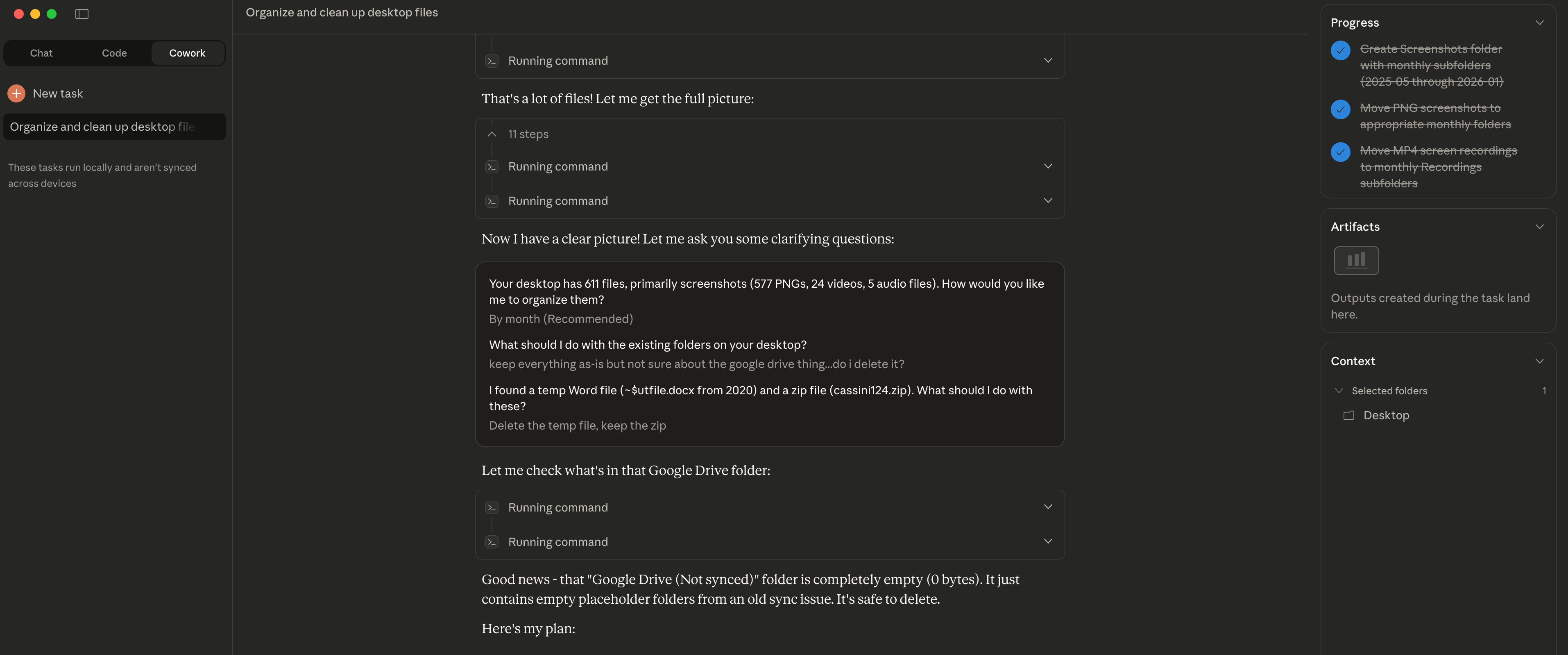
The Easy Part Is Over I decided to try Claude Cowork for something simple: organizing my desktop. I had accumulated months worth of files, mostly screenshots - 611 in total. Claude asked me clarifying questions first: "How would you like me to organize them?" "What about the existing folders?" "The random zip file from years ago?" Once I answered, it sorted everything into folders by year and month. Took about 2 minutes. Here's the insight though: file organization worked well because the structure (dates) was already visible in the filenames. Screenshots have timestamps. Claude could use that metadata. For files without clear naming conventions or inherent structure? That's where things get harder. The easy part is indeed over - the interesting challenges are just beginning.
📁 File Management Community
Desktop Screenshot Organization
Author had Claude organize 611 desktop files (mostly screenshots) accumulated over months, sorted by year and month in 2 minutes
★☆☆ Beginner 2 min January 13, 2026
📋
Scenario
My desktop has accumulated files over several months, mostly screenshots, now 611 files total, and I want to make it more organized.
💬
Prompt
Help me organize my desktop.
✨
Expected Result
Claude first asked clarifying questions: - "How would you like me to organize them?" - "What about the existing folders?" - "The random zip file from years ago?" Then based on timestamp metadata in filenames, sorted 611 files into folders by year and month **in 2 minutes**. **Key insight:** File organization worked well because structure (dates) was already visible in filenames.
💡
Tips
- • Screenshot files usually contain date timestamps, perfect for auto-organization
- • Claude will ask about your preferences first before acting
- • May not work as well for files without clear naming conventions